

The Merton Update introduces notes to scienceOS. You can now annotate saved answers and chats, or create stand-alone notes within your projects.
Science advances through reflection, critique, and shared understanding. With notes, trusted AI-generated answers become evolving building blocks where you can add interpretation, raise questions, suggest sources, and tag collaborators in shared projects.
By attaching context directly to saved insights, findings turn into a transparent and cumulative knowledge system, ensuring that ideas are not only stored but refined, and confidently built upon together.
Here are two practical ways to use notes in your research workflow.
Turn AI answers into a solid research base.
Often, you may find yourself juggling multiple chats, PDFs, and projects, struggling to remember which insight came from where and fearing that important details might be lost along the way.
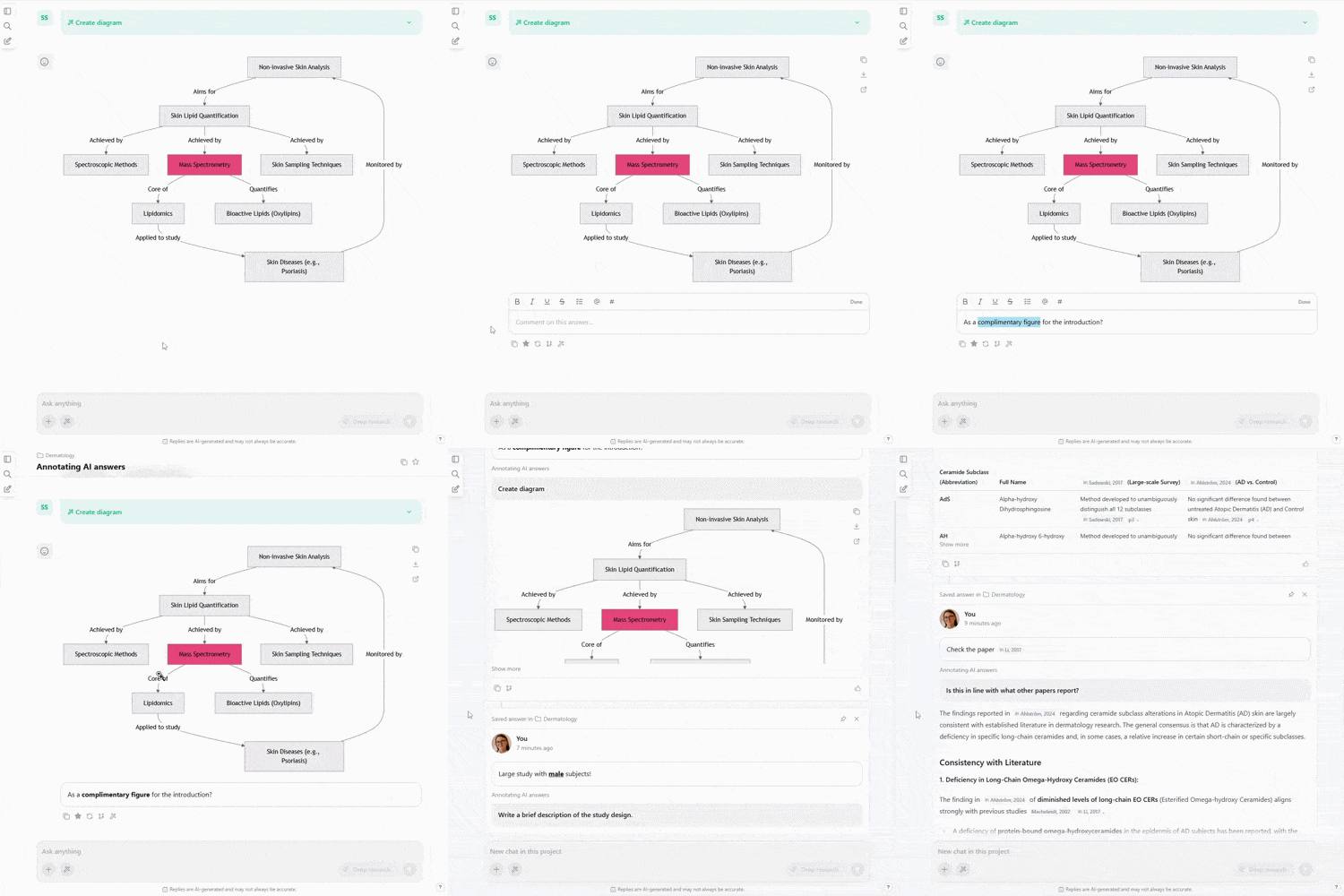
By saving AI-generated answers and adding notes with your own highlights, critical reflections, or follow-up questions, you transform scattered information into an organized, trustworthy foundation.
Over time, this curated collection becomes a reliable map of your work, allowing you to revisit, build on, and confidently share your insights without second-guessing their accuracy.
Make your projects smarter.
In collaborative projects, key observations and references often stay trapped in personal folders or chat threads, making it hard to know who has seen what and leaving the team at risk of duplicated effort or misaligned understanding.
Saving AI-generated answers, adding notes, and tagging collaborators, helps every teammate know which insight is relevant to them and build trust that nothing is being overlooked.
This transparent, traceable system ensures that ideas evolve naturally, decisions are aligned, and the team collectively builds on verified insights.
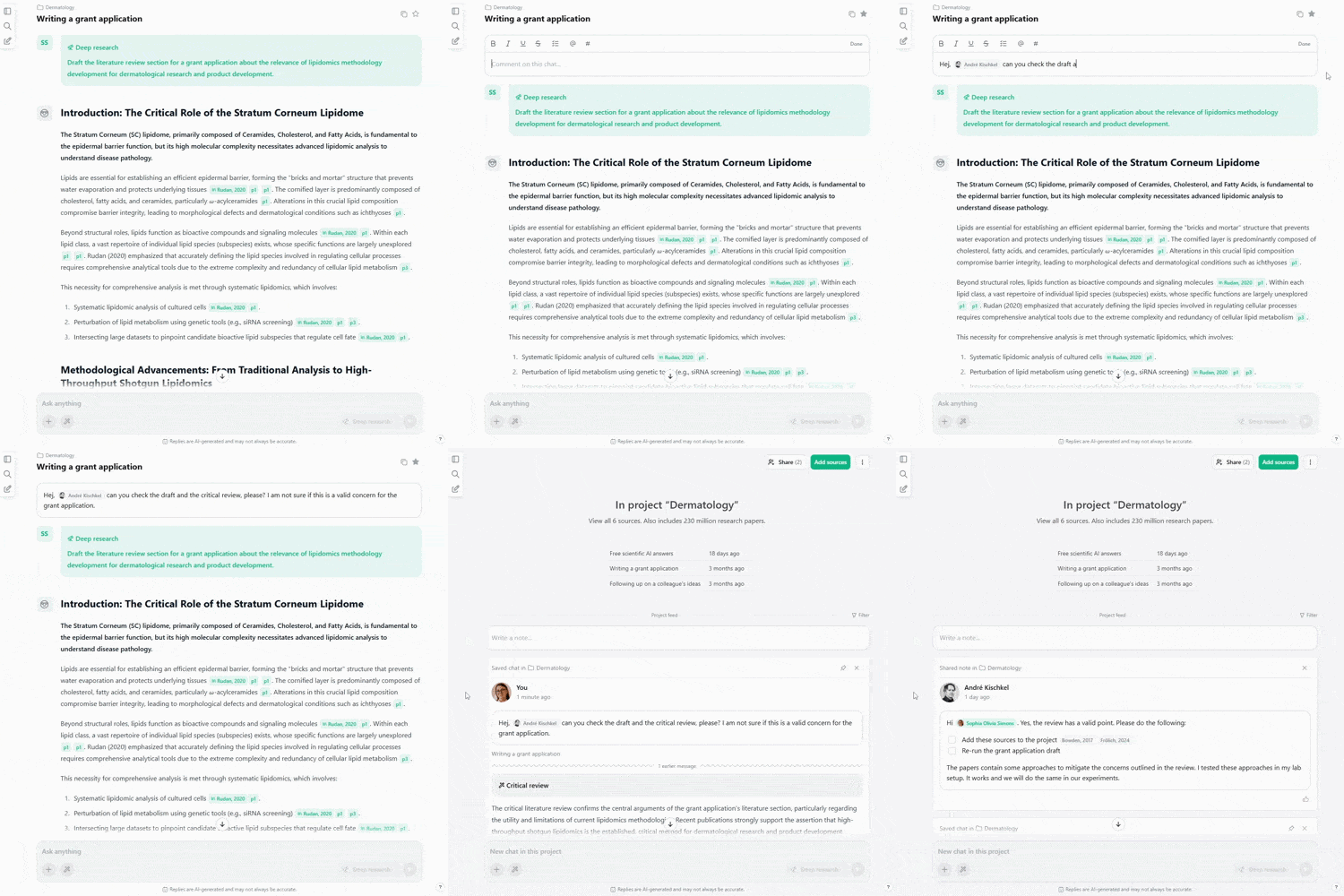
Saving AI-generated answers, adding notes, and tagging collaborators, helps every teammate know which insight is relevant to them and build trust that nothing is being overlooked.
This transparent, traceable system ensures that ideas evolve naturally, decisions are aligned, and the team collectively builds on verified insights.
Why Merton Update?
This update of scienceOS is dedicated to Robert K. Merton, who shaped our understanding of how scientific knowledge grows; not in isolation but through communal scrutiny, cumulative insight, and organized skepticism. He showed that science advances when findings are shared, questioned, contextualized, and built upon.
AI and us: building trust in research.
Sign up for a webinar about AI ethics in scientific research. On April 10, three speakers will present and discuss their findings.
Artificial intelligence (AI) is rapidly becoming a fundamental pillar in the modern research toolkit, and its integration has created significant discussions within the scientific community.
While many researchers are enthusiastic, a lack of consensus on ethical and appropriate use has led to widespread uncertainty and inconsistent guidelines, as well as stigmatization of AI usage in research. This free webinar aims to discuss one of the questions that divides the scientific community: Should scientists build a trusted partnership with AI in their research? If yes, how can they do it?
Quick facts
- Format: Webinar with three short talks and a discussion round
- Date: April 10, 2026 at 14:00 (CEST, Berlin Time)
- Registration: Sign up here
Quality-of-life improvements & fixes.
We implemented several quality-of-life improvements, including faster PDF processing and improved bulk import management, and fixed some bugs.
Improvements
- Made PDF processing ~ 10x faster
- New drop zone in “Add sources” to add PDFs directly to projects
- Made AI Action “Create diagram” more flexible
- Allowed staring/saving of full chats
- Added a three-dots menu to sources with some quick options
- Import of PDFs to library auto-starts on last step now
- Better metadata extraction from uploaded PDFs
- Zotero import progress bar reflects actual progress better
- Prioritize user-generated source metadata during Zotero import
- New email button next to the project invitation link
- Made finding all projects from the left sidebar more intuitive
- Renamed “Citations analysis” to “Consensus analysis”
Fixes
- Rarely, the AI generated its answer twice
- Sometimes, the same source had different APA suffixes
- Fixed a bug with “Chat with PDF” for sources from shared projects