
References are essential for credible and ethical research. They show where ideas come from, support researchers’ claims, and allow readers to verify the accuracy of the information. They also help avoid plagiarism by giving proper credit.
The AI research agent scienceOS helps scientists conduct a literature review, organize their references, and even verify their own work.
- Upload papers
Upload all sources cited by your manuscript to your scienceOS library.
- Create a new project
Create a new project from the app homepage or click the plus button in the sidebar to create a new project. Give it a compelling name and add all the previously uploaded literature to the project sources.
- Upload your manuscript
Start a new chat with the project and upload your manuscript to the chat.
- Use ‘deep research’ to verify your bibliography
Enter a verification prompt (e.g. “Check each citation in my manuscript to make sure that I am not ill-citing any of the papers.”) and use the ‘deep research’ mode. Answer any clarification questions and wait.
If the prompt did not contain specific instructions about the output format, in most cases, the AI assistant will generate structured results in a tabular format.
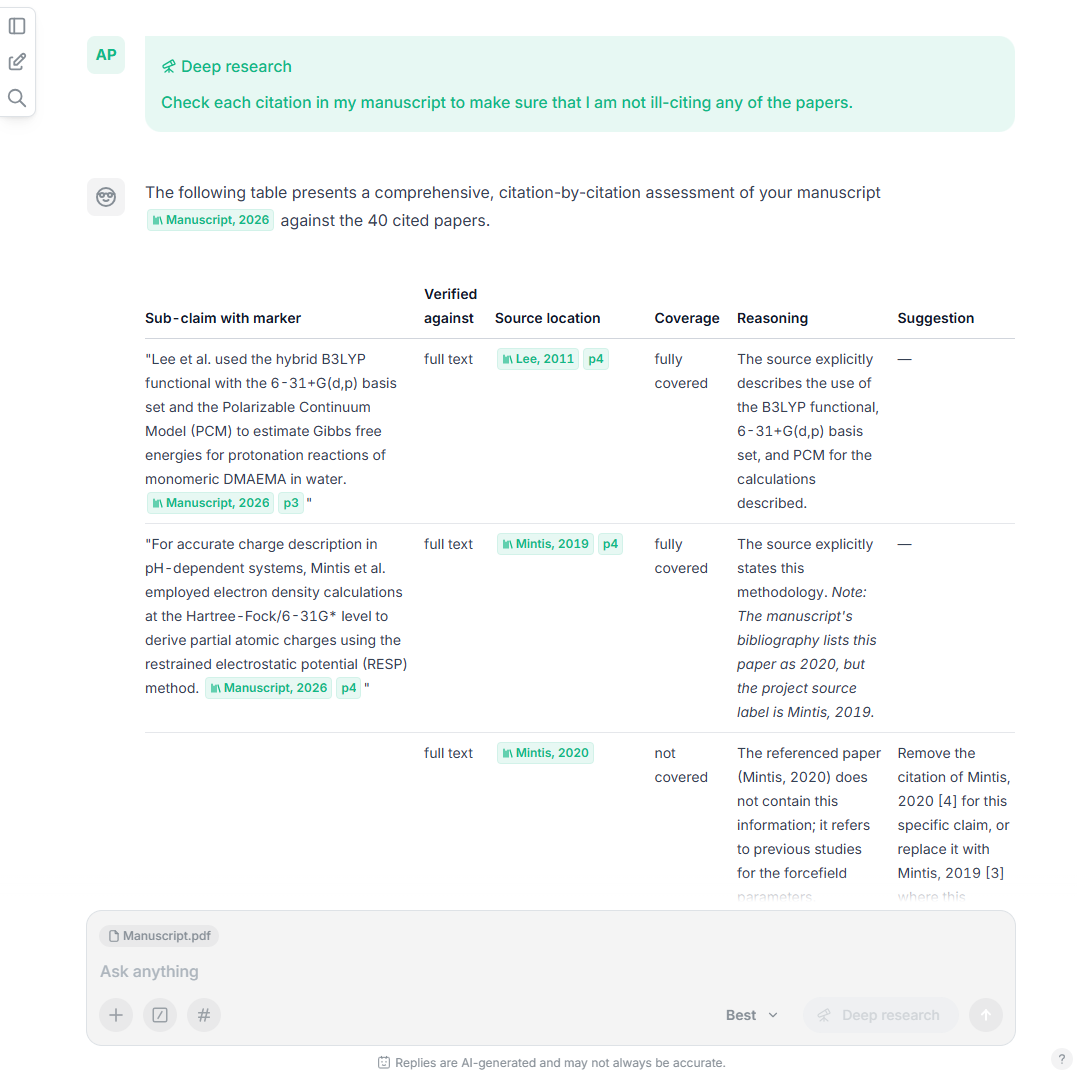
Verify the accuracy of citations in your manuscript. A screenshot showing the final output of the citation verification check powered by the ‘deep research’ mode. Each sub-claim in the manuscript has been checked against its cited sources.
For longer manuscript with many citations, the AI research agent may be limited by the number of references it can process in one single request. When this occurs, the AI will inform you and ask for your approval to continue the verification process.
The described workflow instructs the AI research agent to verify your manuscript’s bibliography using the sources in your scienceOS project. It will neither replace your references or search for new ones; it simply checks the claims in your work against the sources provided by you.
AI disclosure review
As AI tools become increasingly common in research and writing, remember to disclose their use as required before submission. If you use the AI disclosure template by scienceOS, you may copy your prompt into the section ‘Assisting with reference list compilation’ and enter further details such as “verifying citations and sources” to help readers understand your use of AI.
If your AI disclosure statement is part of your manuscript, you may also use scienceOS to review it. The AI assistant may highlight whether AI use is mentioned, and comment on the clarity and comprehensiveness of the disclosure.
The AI agent scienceOS helps you streamline reference and AI disclosure checks, making your research accurate, transparent, and ready for submission. Researchers can easily validate citations and meet publication requirements.