

Literature reviews are comprehensive overviews of existing knowledge on a specific topic. They synthesize current research, identify gaps, and provide context for new investigations. The primary purpose is to situate a research project within the existing body of knowledge.
A typical literature review includes the following components:
- Introduction: The introduction defines the review’s topic, research question, and scope.
- Body: The body organizes the literature into themes, trends, or methodologies, critically analyzing each source.
- Conclusion: The conclusion summarizes significant findings, identifies gaps, and suggests areas for further research.
Literature reviews are integral to theses, dissertations, research proposals, and journal articles. They help justify the research approach, ensure originality, and guide scholarly and policy decisions.
An AI tool for literature reviews
Conducting a literature review is traditionally time-consuming and labour-intensive. However, AI-powered tools offer transformative support by augmenting key tasks such as literature search, evaluation, and synthesis. These tools apply advanced filters, assess methodology, and perform consensus analyses – helping researchers uncover thematically connected studies and sample relevant work more efficiently.
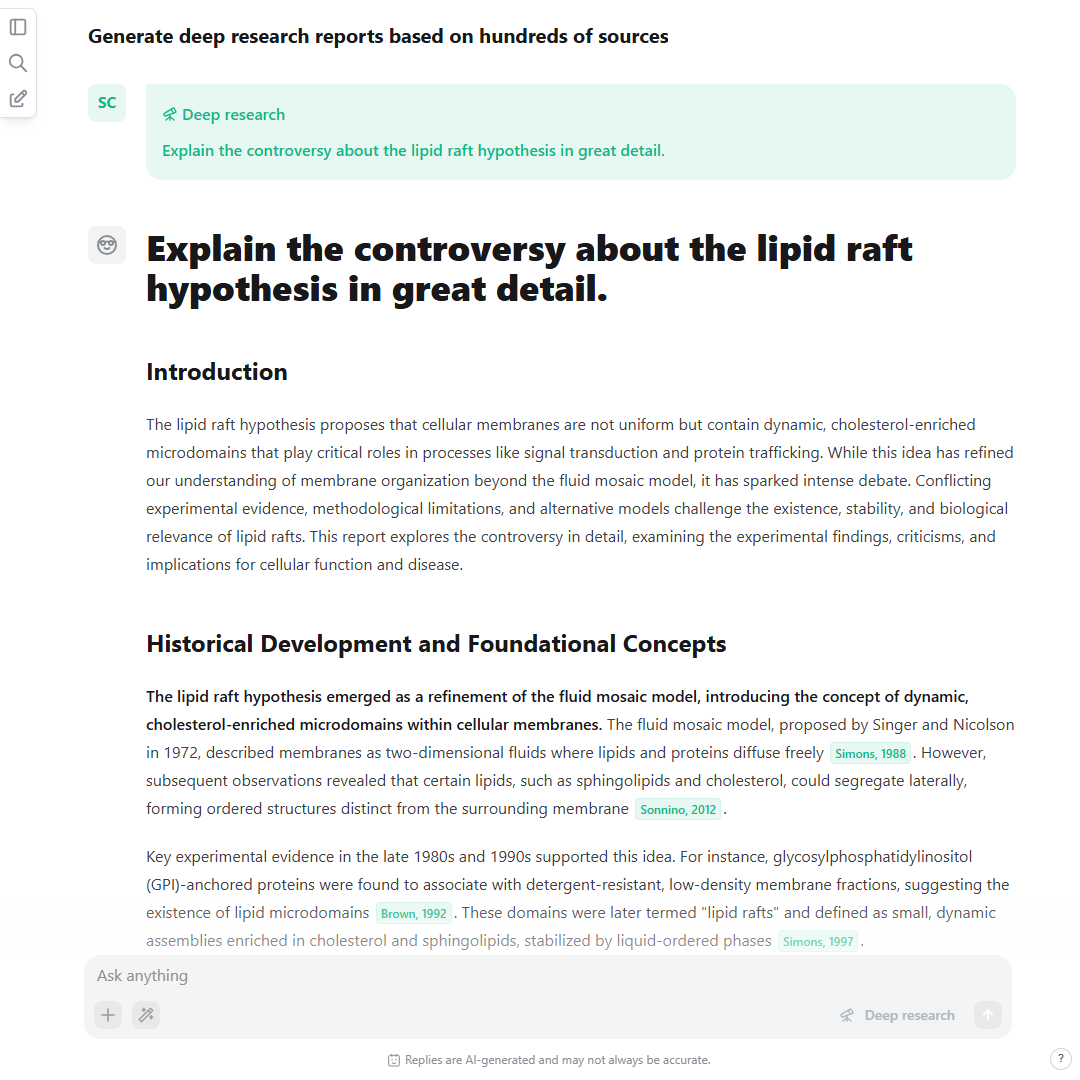
AI-based literature review generator. A screenshot of a literature review generated with the “deep research” mode and based on hundreds of sources.
The AI research agent scienceOS goes beyond simply identifying research gaps. It also acts as an AI literature review generator, capable of assisting you in drafting well-structured reviews. Supporting both the discovery and writing phases, AI agents like scienceOS help researchers set up a review’s structure and build the foundation for deeper analysis.
This tutorial will demonstrate how to integrate the AI tool scienceOS into your literature review workflow.
Starting from scratch with “deep research”
The “deep research” mode in scienceOS helps generate a first draft of a literature review based on your chosen topic and criteria. This feature is beneficial for building an initial structure and guiding the writing process.
Here is how to use it:
- Start: Start a new chat.
- Describe your topic: Describe your topic and specific criteria (e.g., methodology, time frame, author).
- Use “deep research”: Use the “deep research” mode; the AI research agent will browse hundreds of relevant sources and generate a detailed report.
The AI-generated review will be several pages long and include key structural elements – introduction, body, and conclusion – organized around the most relevant findings. You may also copy the generated text for offline use, add the cited papers to your personal library, or continue chatting to dig deeper into individual sections.
AI literature review based on your literature
It is also possible to draft a report based on all papers or a subset of sources from your library by organizing your library into collections and creating projects. Simply follow these steps:
- Upload papers
Click the pink plus button in the top right corner of your scienceOS library to upload PDFs, connect and import your Zotero web library, or add an export of your reference manager to your scienceOS library.
- Add sources to collections (optional)
Select relevant sources in the AI reference manager, click “Add to collection(s)” and create new collection tags or choose from existing collections.
- Create a new project
Use the “New project” button on the app homepage or click the plus button in the sidebar. Name the project to reflect your topic or goal.
- Add sources to the project
You can add individual documents, one or more collections, or your entire library to the project sources. (You can still modify what the AI can access after creating the project.)
- Invite and manage project members (optional)
During the last step of the project setup, copy the project invitation link and send it to your colleagues.
- Describe your topic
Describe your topic and specific criteria (e.g., methodology, time frame, author) in the message bar.
- Use “deep research”
Use the “deep research” mode; the AI research agent will generate a literature review based on the sources in your project. (If your library contains PDFs, citation marks will also include page numbers, allowing for easy double-checking.)
Drafting a literature review based on your reference manager is ideal for quickly generating comprehensive mini-reviews or solid first drafts for sections like the introduction of a grant application.
Writing literature reviews with AI based on your projects. A brief video showing how to upload PDFs to your library, organize them in collections, create a new project that contains the collection, draft a literature review based on the sources added to the project, and critically review the generated text by accessing 230 million papers.
Additionally, you can use the AI Action “Critical review” to evaluate what might be missing in your literature review by analysing gaps and recommending additional perspectives based on papers outside your library.
Whether using the whole library or a specific project collection, scienceOS allows you to refine and build upon the generated draft easily in a trustworthy environment. You can copy the draft for offline editing, continue expanding the literature review using additional AI features, or visualise the citation network of sources used to formulate the report.
An AI literature review generator
The scienceOS AI research agent supports researchers throughout the literature review process, from summarizing research papers and organizing your literature collection to amplifying insights and producing structured drafts. By integrating it into your workflow, you not only speed up your research but also elevate the quality and focus of your literature review writing.